
So i’ve been hosting a modded Minecraft server for my friends and me on weekends. While it’s been a blast, I’ve noticed that our current setup using LAN has its limitations. My friends have been eagerly waiting for their next “fix” (i.e., when they can get back online), and I’ve been replying with a consistent answer: this Friday.
However, exploring cloud providers to spin up a replica of my beloved “Dog Town” Server was a costly endeavor, at least for a setup that’s close to my current configuration. As a result, I’ve turned my attention to self-hosting a Minecraft server on my local network and configuring port forwarding.
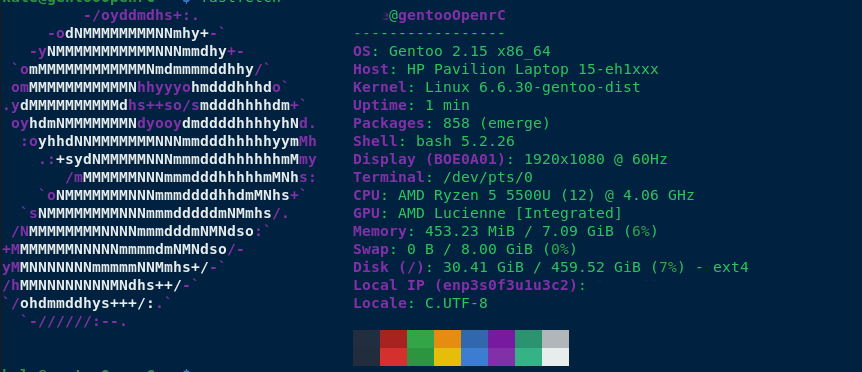
To harden my server, I’ve implemented the following measures:
- Added ufw (Uncomplicated Firewall) for enhanced security.
- Blocked all SSH connections except for the IP addresses of my main PC and LAN rig.
- Enabled SSH public key authentication only.
- Rebuilt all packages using a hardened GCC compiler.
- Disabled root access via
/etc/passwd. - Created two users: one with sudo privileges, allowing full access; the other with limited permissions to run a specific script (
./run.sh) for starting the server.
Additionally, I’ve set up a fcron job (a job scheduler) as disabled root, which synchronizes my Minecraft server with four folders at the following intervals: 1 hour, 30 minutes, 10 minutes, and 1 day. This ensures that any mods we use are properly synced in case of issues.
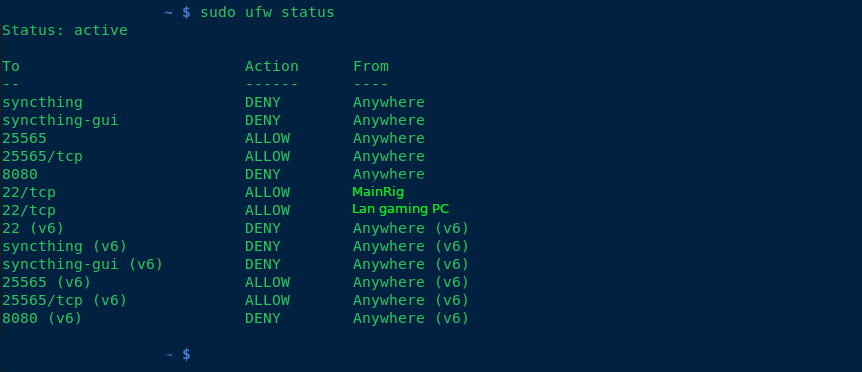
any suggestions of making the computer any more secure, aswell as backup solutions? thanks!
–edit Im using openRc as my init system and my networking plan, is to have dogtown on a vlan via my 48port switch.
–added note, what hostnames do you guys call your servers? I used my favorite band albums and singles for hostnames.
Fellow Gentoo user! Kudos.
If you are port forwarding. I recommend not exposing it on the default port of 25565 and instead expose it as a random port. Then, assuming you have a domain name, create an SRV record that points to your IP and port. This will cut down on the drive by scanners who scan by ports, but won’t totally eliminate it. If you do use the SRV record, your friends won’t even notice there’s a different port.
Totally agree with the mentions of Wireguard and Tailscale. They make this super easy. Have done exactly this myself before, for the same use case.
However at the time, i had to change something in the server-properties config file in order for it to work properly. Minecraft servers still authenticate users when hosting yourself (afaik). This however isnt possible over a mesh netowrk like wireguard/tailscale. I simply had to change a boolean value of the line called something like, server-online, or online-mode…
Best of luck!
i think i may go with wire guard, do you know of any good videos or tutorials? i found this, https://www.digitalocean.com/community/tutorials/how-to-set-up-wireguard-on-ubuntu-20-04
I recommend using a docker container, they make the whole thing painless and easy.
I think the Linuxserver.io one is what I used from memory.
IMO the biggest attack vector there would be a Minecraft exploit like log4j, so the most important part to me would make sure the game server is properly sandboxed just in case. Start from a point of view of, the attacker breached Minecraft and has shell access to that user. What can they do from there? Ideally, nothing useful other than maybe running a crypto miner. Don’t reuse passwords obviously.
With systemd, I’d use the various Protect* directives like ProtectHome, ProtectSystem=full, or failing that, a container (Docker, Podman, LXC, manually, there’s options). Just a bare Alpine container with Java would be pretty ideal, as you can’t exploit sudo or some other SUID binaries if they don’t exist in the first place.
That said the WireGuard solution is ideal because it limits potential attackers to people you handed a key, so at least you’d know who breached you.
I’ve fogotten Minecraft servers online and really nothing happened whatsoever.
Log4j is a Java logging library lolz
Yeah, that didn’t stop it from pwning a good chunk of the Internet: https://en.wikipedia.org/wiki/Log4Shell
That is an exploit OF log4j. Just pointing out the difference.
Have you tried using an audit tool? Check out https://cisofy.com/lynis/
Hey! What is that color scheme? I love it.
its flat theme
Thanks!
If you wanted to go overboard, don’t even make the server accessible publicly. Distribute keys to a Wireguard network that is accessible publicly. Mandate your players obtain keys from you to play.